Comfort Meets Speed
Improved comfort, autospace, algorithm, interface, everything. Free. (mostly, except for a few premium stuff. some nagging involved).
Slide with two thumbs
Just like typing normally, but you have to lift your fingers less.
Your aging fingers will thank you for it.
Autospace, improved
With this on, instead of pressing space, you just type the next word after a really, really short pause. And now, it's smart enough to know when you're peck typing (it will pause autospace).
Autospace is only in the upgraded version. Try it for free with the generous, repeatable free trial.
It's basically free but with nagging.
Of course if you were to upgrade to premium you won't get nagged..
Features
(there's probably more but here's some)
Improved Autospace.
Slide word after word, and the spaces put themselves in. Smarter timing lets you go really, really fast.
Two thumbs at once.
Slide with either thumb, or both. A word can start under one thumb and finish under the other.
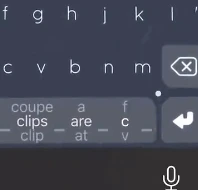
Flick to choose alternatives. Now from the spacebar
Used to be that you have to have an extra row just for this, now you can just do it from the spacebar
Tap when you want.
Peck a few letters and Nintype types them exactly as tapped. Slide again whenever you like. Useful for new words
Learns your words.
New words, names and slang join your dictionary as you use them. Favourite a word, or ban one for good. You'll have to peck type them the first time you use them though. And use them often otherwise the keyboard will forget them.
Emoji from words.
Type a word and slide to its emoji.
Speaks your languages.
Type in more than one language without switching. The globe key shows which one is next.
Learn it in minutes.
The tutorials teach sliding with two thumbs from the very first lesson.
Bring your old words.
Import the words and settings you taught the original Nintype.
Split for iPad.
On a wide screen the keyboard splits for your thumbs, and a slide can cross the gap.
Sounds and haptics.
Pick a sound theme, or turn it all off.
Open Access Optional
Nintype types without Open Access. What you type stays on your phone. But we'll need it for unlocking your purchase though (don't blame me, uh, blame the big guy)
No OpenGL. Native GUI.
Drawn with the phone's own UI instead of OpenGL. Reduced memory usage (hopefully).
Improved performance.
Roughly 50% less memory usage (pulled this number out of my ass), but some heavy optimizations were done.
Tested on an iPhone X (old)
So you know this'll work well on your aging or less than bleeding edge phones.
𝓒𝓾𝓼𝓽𝓸𝓶 𝓯𝓻𝓮𝓪𝓴𝔂 𝓯𝓸𝓷𝓽𝓼
𝑌𝑜𝑢 𝑐𝑎𝑛 𝑛𝑜𝑤 𝑤𝑟𝑖𝑡𝑒 𝑖𝑛 𝑖𝑡𝑎𝑙𝑖𝑐𝑠! 𝑌𝑜𝑢 𝑐𝑎𝑛 𝑑𝑜 𝑡ℎ𝑖𝑠 𝑎𝑛𝑦𝑤ℎ𝑒𝑟𝑒! 𝕺𝖗 𝖒𝖆𝖞𝖇𝖊 𝖞𝖔𝖚 𝖕𝖗𝖊𝖋𝖊𝖗 𝖙𝖍𝖎𝖘 𝖐𝖎𝖓𝖉 𝖔𝖋 𝖋𝖔𝖓𝖙𝖘? 🅽🅾 🅿🆁🅾🅱🅻🅴🅼, 🆈🅾🆄 🅲🅰🅽 🅳🅾 🅸🆃 🅰🅻🅻.
Speaks your languages.
Type in more than one language without switching. The globe key shows which one is next.
- English
- Deutsch
- Español
- Français
- Italiano
- Português
More languages are on the way.
Nintype 2
Free on iPhone and iPad. Autospace is a one-time in-app purchase. (endless free trials for autospace is available though)
Privacy
Your data stays on your phone. Keyboard open access is necessary only for buying the premium upgrade, but non-autospace mode works even without open access. If only you can buy it without enabling open access, oh well. But open access also necessary for the nintype app (not the keyboard extension) to talk to the app, but otherwise, the keyboard doesn't phone home with analytics or anything like that.